
Note
Go to the end to download the full example code.
Number of threads used to load and save ONNX models#
This example benchmarks onnx_light.onnx.load() and
onnx_light.onnx.save() while varying the num_threads parameter
across three on-disk layouts:
single-file – everything packed in one
.onnxfile (no external data).2 files – one
.onnxfile plus one external weights file.multi-file – one
.onnxfile plus several external weights files, produced by capping each file withmax_external_file_size.
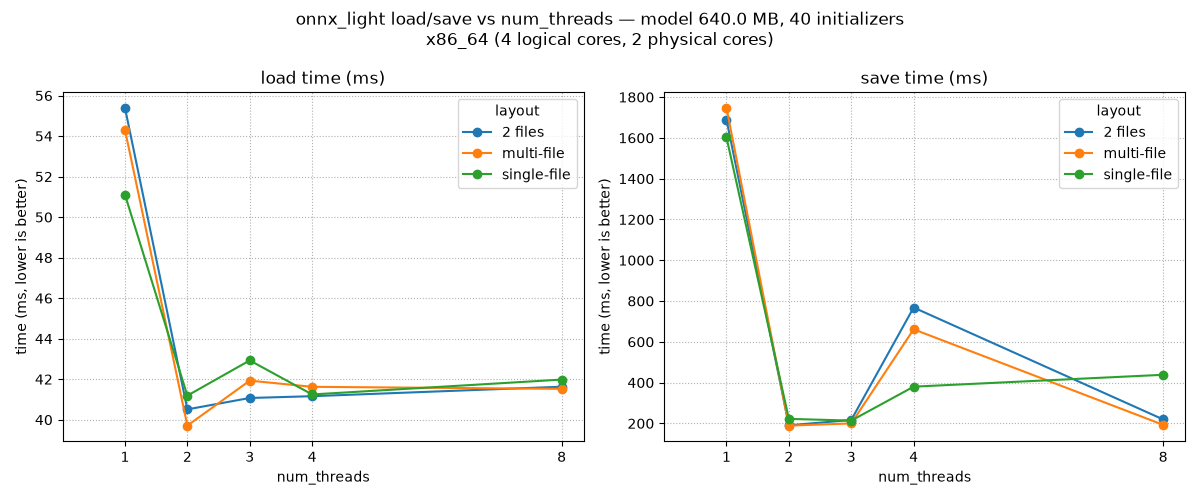
For each (layout, num_threads) combination the script measures the median wall-clock time over a few iterations and plots a summary chart so the effect of parallelism can be compared at a glance.
import os
import platform
import shutil
import time

import matplotlib.pyplot as plt
import numpy as np
import pandas

import onnx_light.onnx.helper as oh
import onnx_light.onnx.numpy_helper as onh
import onnx_light.onnx as onnxl

N_INIT = 8 if os.environ.get("UNITTEST_GOING") == "1" else 40
DIM = 128 if os.environ.get("UNITTEST_GOING") == "1" else 2048
N_ITER = 2 if os.environ.get("UNITTEST_GOING") == "1" else 5
THREAD_COUNTS = (1, 2) if os.environ.get("UNITTEST_GOING") == "1" else (1, 2, 3, 4, 8)


def _detect_processor_name() -> str:
    """Returns a human-readable processor name across common platforms."""
    # ``platform.processor()`` is often empty on Linux; fall back to
    # ``/proc/cpuinfo`` so the chart title shows something meaningful.
    name = platform.processor() or ""
    if not name and os.path.exists("/proc/cpuinfo"):
        try:
            with open("/proc/cpuinfo", encoding="utf-8") as f:
                for line in f:
                    if line.startswith("model name"):
                        name = line.split(":", 1)[1].strip()
                        break
        except OSError:
            pass
    return name or platform.machine() or "unknown"


def _detect_physical_cores() -> int:
    """Returns the number of physical CPU cores, or 0 if it cannot be determined."""
    # On Linux, count unique (physical id, core id) pairs in ``/proc/cpuinfo``.
    if os.path.exists("/proc/cpuinfo"):
        try:
            cores: set[tuple[str, str]] = set()
            physical_id = ""
            core_id = ""
            with open("/proc/cpuinfo", encoding="utf-8") as f:
                for line in f:
                    if line.startswith("physical id"):
                        physical_id = line.split(":", 1)[1].strip()
                    elif line.startswith("core id"):
                        core_id = line.split(":", 1)[1].strip()
                    elif line.strip() == "":
                        if physical_id and core_id:
                            cores.add((physical_id, core_id))
                        physical_id = ""
                        core_id = ""
            if physical_id and core_id:
                cores.add((physical_id, core_id))
            if cores:
                return len(cores)
        except OSError:
            pass
    return 0


CPU_COUNT = os.cpu_count() or 1
PHYSICAL_CORE_COUNT = _detect_physical_cores()
PROCESSOR_NAME = _detect_processor_name()
print(f"Processor: {PROCESSOR_NAME}")
print(f"Logical cores: {CPU_COUNT}")
print(f"Physical cores: {PHYSICAL_CORE_COUNT or 'unknown'}")


def make_model(n_init: int = N_INIT, dim: int = DIM) -> onnxl.ModelProto:
    """Builds a synthetic ONNX model with *n_init* dense ``Gemm`` weights."""
    initializers = []
    nodes = []
    inputs = [oh.make_tensor_value_info("X", onnxl.TensorProto.FLOAT, [None, dim])]

    prev = "X"
    for i in range(n_init):
        weight_name = f"W{i}"
        out_name = f"Y{i}"
        w = np.random.randn(dim, dim).astype(np.float32)
        initializers.append(onh.from_array(w, name=weight_name))
        nodes.append(oh.make_node("Gemm", [prev, weight_name], [out_name], transB=1))
        prev = out_name

    outputs = [oh.make_tensor_value_info(prev, onnxl.TensorProto.FLOAT, [None, dim])]
    graph = oh.make_graph(nodes, "bench_graph", inputs, outputs, initializer=initializers)
    return oh.make_model(graph, opset_imports=[oh.make_opsetid("", 18)], ir_version=9)


def median_time(fn, n_iter: int = N_ITER) -> float:
    """Runs *fn* *n_iter* times and returns the median wall-clock time (seconds)."""
    timings = []
    for _ in range(n_iter):
        begin = time.perf_counter()
        fn()
        timings.append(time.perf_counter() - begin)
    return float(np.median(timings))
Processor: x86_64
Logical cores: 4
Physical cores: 2
Build the model and prepare on-disk layouts#
Three reference files are produced once and then reused for the load benchmarks: a single packed file, a model with one external data file, and a model whose external data is split into several files.
model = make_model()
size_mb = model.ByteSize() / 2**20
print(f"Model size: {size_mb:.2f} MB ({N_INIT} initializers, dim={DIM})")

out_dir = "temp_plot_threads_load_save"
os.makedirs(out_dir, exist_ok=True)

single_path = os.path.join(out_dir, "model_single.onnx")
two_path = os.path.join(out_dir, "model_two.onnx")
two_data = two_path + ".data"
multi_path = os.path.join(out_dir, "model_multi.onnx")
multi_data = multi_path + ".data"

# Build each reference file from the same in-memory ModelProto. We load
# the freshly written single-file model back through onnx_light so the
# external-data writers operate on an ``onnxl.ModelProto``.
onnxl.save(model, single_path)
onnxl_model = onnxl.load(single_path)
onnxl.save(onnxl_model, two_path, location=two_data)

# Cap each external weights file at roughly a third of the total payload
# so several files are produced regardless of the chosen DIM.
total_bytes = sum(len(init.raw_data) if init.raw_data else 0 for init in model.graph.initializer)
max_file = max(total_bytes // 3, 1)
onnxl.save(onnxl_model, multi_path, location=multi_data, max_external_file_size=max_file)

multi_files = sorted(p for p in os.listdir(out_dir) if p.startswith("model_multi.onnx.data"))
print(
    f"Layouts ready: single ({os.path.getsize(single_path) / 2 ** 20:.2f} MB), "
    f"2-file (graph={os.path.getsize(two_path) / 1024:.1f} KB, "
    f"data={os.path.getsize(two_data) / 2 ** 20:.2f} MB), "
    f"multi-file ({len(multi_files)} data files)"
)
Model size: 640.00 MB (40 initializers, dim=2048)
Layouts ready: single (640.00 MB), 2-file (graph=5.0 KB, data=640.00 MB), multi-file (4 data files)
Benchmark#
For each layout and thread count we time both the load operation
(reading from disk into an onnxl.ModelProto) and the save operation
(serializing the in-memory model back to a fresh path).
LAYOUTS = (
    ("single-file", single_path, None),
    ("2 files", two_path, two_data),
    ("multi-file", multi_path, multi_data),
)

rows = []
for layout_name, model_path, data_path in LAYOUTS:
    for num_threads in THREAD_COUNTS:

        def _load(path=model_path, threads=num_threads):
            onnxl.load(path, num_threads=threads, load_external_data=True)

        load_t = median_time(_load)

        save_out = os.path.join(
            out_dir, f"out_{layout_name.replace(' ', '_')}_t{num_threads}.onnx"
        )
        save_data = save_out + ".data" if data_path is not None else None

        if data_path is None:

            def _save(out=save_out, threads=num_threads):
                onnxl.save(onnxl_model, out, num_threads=threads)

        elif layout_name == "multi-file":

            def _save(out=save_out, data=save_data, threads=num_threads, cap=max_file):
                onnxl.save(
                    onnxl_model,
                    out,
                    location=data,
                    num_threads=threads,
                    max_external_file_size=cap,
                )

        else:

            def _save(out=save_out, data=save_data, threads=num_threads):
                onnxl.save(onnxl_model, out, location=data, num_threads=threads)

        save_t = median_time(_save)

        rows.append(
            {
                "layout": layout_name,
                "num_threads": num_threads,
                "load_ms": load_t * 1e3,
                "save_ms": save_t * 1e3,
            }
        )
        print(
            f"{layout_name:<11} threads={num_threads:<2} "
            f"load={load_t * 1e3:7.2f} ms  save={save_t * 1e3:7.2f} ms"
        )

df = pandas.DataFrame(rows)
print(df)
single-file threads=1  load=  58.06 ms  save=1609.23 ms
single-file threads=2  load=  42.61 ms  save= 211.60 ms
single-file threads=3  load=  42.11 ms  save= 218.41 ms
single-file threads=4  load=  44.34 ms  save= 456.31 ms
single-file threads=8  load=  45.18 ms  save= 219.33 ms
2 files     threads=1  load=  63.33 ms  save=1553.59 ms
2 files     threads=2  load=  47.67 ms  save= 206.65 ms
2 files     threads=3  load=  44.75 ms  save= 228.72 ms
2 files     threads=4  load=  45.42 ms  save= 231.79 ms
2 files     threads=8  load=  46.97 ms  save= 232.08 ms
multi-file  threads=1  load=  65.18 ms  save=1948.45 ms
multi-file  threads=2  load=  44.07 ms  save= 199.29 ms
multi-file  threads=3  load=  45.04 ms  save= 207.30 ms
multi-file  threads=4  load=  45.67 ms  save= 199.46 ms
multi-file  threads=8  load=  45.04 ms  save= 179.18 ms
         layout  num_threads    load_ms      save_ms
0   single-file            1  58.064465  1609.234689
1   single-file            2  42.610528   211.604678
2   single-file            3  42.110616   218.411709
3   single-file            4  44.342056   456.308194
4   single-file            8  45.177947   219.326316
5       2 files            1  63.333598  1553.591548
6       2 files            2  47.672989   206.649102
7       2 files            3  44.749507   228.715095
8       2 files            4  45.415671   231.790405
9       2 files            8  46.965945   232.083328
10   multi-file            1  65.177980  1948.446633
11   multi-file            2  44.072320   199.291319
12   multi-file            3  45.035364   207.304705
13   multi-file            4  45.669154   199.464948
14   multi-file            8  45.043540   179.181716
Conclusion plot#
The two panels below summarise the impact of num_threads on each
layout. Lines that flatten quickly indicate operations that are
already I/O bound and gain little from additional threads, while a
steady downward slope reveals where parallelism pays off.
load_pivot = df.pivot(index="num_threads", columns="layout", values="load_ms")
save_pivot = df.pivot(index="num_threads", columns="layout", values="save_ms")

fig, axes = plt.subplots(1, 2, figsize=(12, 5), sharex=True)
for ax, pivot, title in (
    (axes[0], load_pivot, "load time (ms)"),
    (axes[1], save_pivot, "save time (ms)"),
):
    for layout in pivot.columns:
        ax.plot(pivot.index, pivot[layout], marker="o", label=layout)
    ax.set_title(title)
    ax.set_xlabel("num_threads")
    ax.set_ylabel("time (ms, lower is better)")
    ax.set_xlim(left=0)
    ax.set_xticks(list(THREAD_COUNTS))
    ax.grid(True, linestyle=":")
    ax.legend(title="layout")

fig.suptitle(
    f"onnx_light load/save vs num_threads — model {size_mb:.1f} MB, "
    f"{N_INIT} initializers\n{PROCESSOR_NAME} "
    f"({CPU_COUNT} logical cores, "
    f"{PHYSICAL_CORE_COUNT or 'unknown'} physical cores)"
)
fig.tight_layout()
fig.savefig("plot_threads_load_save.png")
Cleanup#
shutil.rmtree(out_dir, ignore_errors=True)
Total running time of the script: (0 minutes 59.627 seconds)
Related examples
Benchmark streaming vs in-memory alignment of external data
Measures loading and saving time for an ONNX model
Gallery generated by Sphinx-Gallery
Example last updated
- Date:
2026-10-05