
Note
Go to the end to download the full example code.
Save an ONNX model in the ORT flatbuffer format and compare sizes#
onnxruntime defines a flatbuffer
serialization (.ort) of an ONNX model that avoids a protobuf parsing
step when loading in the runtime.
onnx-light exposes the format through
onnx_light.onnx.SerializeFormat. This example uses the native
C++ writer to produce .ort files and compares the on-disk sizes of the
two formats as the number of nodes grows. ONNX Runtime is used only to
verify inference, not to convert or serialize the model. The native reader
then reconstructs an ONNX model from the ORT file for another inference
comparison. It accepts both native version-4 and current ORT version-6
files. A full ONNX Runtime build is required to execute the generated
version-4 files directly; minimal runtime builds are not supported.
See html_theme.sidebar_secondary.remove for the short recipe.
import os
import shutil

import matplotlib.pyplot as plt
import numpy as np
import onnxruntime

import onnx_light.onnx as onnxl
import onnx_light.onnx.helper as oh
import onnx_light.onnx.numpy_helper as onh
Build a chain of Gemm nodes#
A small helper builds a model with num_nodes chained Gemm nodes
(one float32 weight matrix per node) so the saved files have a
non-trivial size that scales linearly with num_nodes. DIM
shrinks when the example runs in the documentation build
(UNITTEST_GOING=1) so the build stays cheap.
DIM = 32 if os.environ.get("UNITTEST_GOING") == "1" else 128


def build_model(num_nodes: int, dim: int = DIM) -> onnxl.ModelProto:
    """Builds an ONNX model with *num_nodes* chained ``Gemm`` nodes."""
    rng = np.random.default_rng(0)
    inputs = [oh.make_tensor_value_info("X", onnxl.TensorProto.FLOAT, [None, dim])]
    outputs = [
        oh.make_tensor_value_info(f"Y{num_nodes - 1}", onnxl.TensorProto.FLOAT, [None, dim])
    ]
    initializers = []
    nodes = []
    prev = "X"
    for i in range(num_nodes):
        w = rng.standard_normal((dim, dim)).astype(np.float32)
        w_name = f"W{i}"
        out_name = f"Y{i}"
        initializers.append(onh.from_array(w, name=w_name))
        nodes.append(oh.make_node("Gemm", [prev, w_name], [out_name], transB=1))
        prev = out_name
    graph = oh.make_graph(nodes, "demo_graph", inputs, outputs, initializer=initializers)
    return oh.make_model(graph, opset_imports=[oh.make_opsetid("", 18)], ir_version=9)
Save helpers#
The .onnx file is written by onnx_light.onnx.save(). The
.ort file is written directly by the native C++ writer. All weights
are already loaded in memory and are embedded inline. Assembly is
single-threaded even if num_threads is set. The same options can
also be passed to model.SerializeToString or
model.SerializeToFileDescriptor.
def save_as_ort(model: onnxl.ModelProto, ort_path: str) -> None:
    """Saves *model* as an ORT flatbuffer at *ort_path*."""
    sopts = onnxl.SerializeOptions()
    sopts.format = onnxl.SerializeFormat.ORT_FLATBUFFERS
    model.SerializeToFile(ort_path, sopts)
Measure sizes for a range of node counts#
out_dir = "plot_save_ort_flatbuffers_output"
os.makedirs(out_dir, exist_ok=True)

node_counts = [1, 2, 4, 8, 16, 32]
onnx_sizes = []
ort_sizes = []

for n in node_counts:
    model = build_model(n)
    onnx_path = os.path.join(out_dir, f"model_{n}.onnx")
    ort_path = os.path.join(out_dir, f"model_{n}.ort")
    onnxl.save(model, onnx_path)
    save_as_ort(model, ort_path)
    onnx_sizes.append(os.path.getsize(onnx_path))
    ort_sizes.append(os.path.getsize(ort_path))

print(f"{'nodes':>6} {'.onnx (KB)':>12} {'.ort (KB)':>12} {'ratio':>8}")
print("-" * 42)
for n, s_onnx, s_ort in zip(node_counts, onnx_sizes, ort_sizes):
    print(f"{n:>6} {s_onnx / 1024:>12.1f} {s_ort / 1024:>12.1f} {s_ort / s_onnx:>8.3f}")
 nodes   .onnx (KB)    .ort (KB)    ratio
------------------------------------------
     1         64.1         66.1    1.031
     2        128.2        131.2    1.024
     4        256.3        261.5    1.020
     8        512.5        522.0    1.018
    16       1024.9       1042.9    1.018
    32       2049.9       2084.9    1.017
Verify inference with ONNX Runtime#
Load the first model in both formats and compare its outputs. The
native writer emits the ORTM identifier and ORT format version 4.
sessions = [
    onnxruntime.InferenceSession(
        os.path.join(out_dir, f"model_{node_counts[0]}.{extension}"),
        providers=["CPUExecutionProvider"],
    )
    for extension in ("onnx", "ort")
]
feeds = {"X": np.ones((2, DIM), dtype=np.float32)}
onnx_result, ort_result = [session.run(None, feeds)[0] for session in sessions]
np.testing.assert_allclose(ort_result, onnx_result, rtol=1e-5, atol=1e-6)
print("ONNX Runtime inference agrees for the ONNX and native ORT files.")
ONNX Runtime inference agrees for the ONNX and native ORT files.
Read the ORT file with onnx-light#
The native reader reconstructs a model that can be serialized as ONNX protobuf and executed. It does not preserve the original protobuf bytes: ORT can normalize graphs and omit original name or documentation details. Compare inference results rather than serialized byte strings.
Decoding honors tensor-byte and recursion limits and raw-data/node
callbacks. It is sequential even with num_threads set and owns
copies of tensor bytes even with no_copy set. External tensor
offsets are rejected instead of guessing an external-data filename.
popts = onnxl.ParseOptions()
popts.format = onnxl.SerializeFormat.ORT_FLATBUFFERS
first_ort_path = os.path.join(out_dir, f"model_{node_counts[0]}.ort")

restored = onnxl.ModelProto()
restored.ParseFromFile(first_ort_path, popts)

with open(first_ort_path, "rb") as source:
    ort_payload = source.read()
restored_from_bytes = onnxl.ModelProto()
restored_from_bytes.ParseFromString(ort_payload, popts)

for reconstructed in (restored, restored_from_bytes):
    reconstructed_session = onnxruntime.InferenceSession(
        reconstructed.SerializeToString(), providers=["CPUExecutionProvider"]
    )
    reconstructed_result = reconstructed_session.run(None, feeds)[0]
    np.testing.assert_allclose(reconstructed_result, onnx_result, rtol=1e-5, atol=1e-6)
print("Native ORT file and memory reads preserve the inference results.")
Native ORT file and memory reads preserve the inference results.
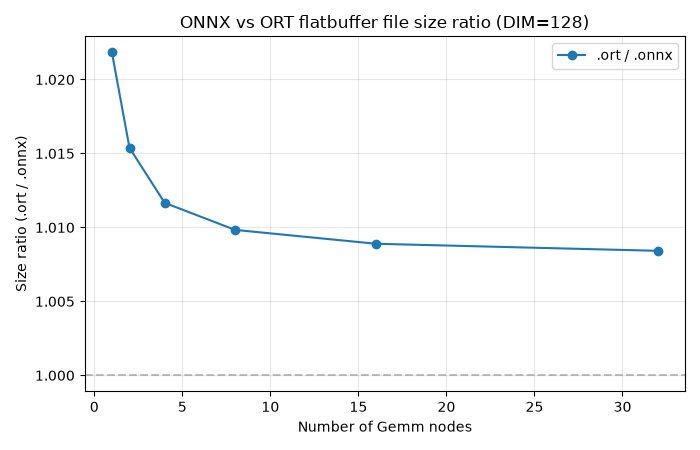
Plot the size ratio vs. number of nodes#
The flatbuffer payload is comparable to the protobuf one and both grow
linearly with the number of weight matrices. The relative overhead
depends on the graph and tensor sizes. Plotting the .ort / .onnx
size ratio makes that overhead easier to read than the raw sizes.
size_ratios = np.array(ort_sizes) / np.array(onnx_sizes)

fig, ax = plt.subplots(figsize=(7, 4.5))
ax.plot(node_counts, size_ratios, marker="o", label=".ort / .onnx")
ax.axhline(1.0, color="gray", linestyle="--", alpha=0.5)
ax.set_xlabel("Number of Gemm nodes")
ax.set_ylabel("Size ratio (.ort / .onnx)")
ax.set_title(f"ONNX vs ORT flatbuffer file size ratio (DIM={DIM})")
ax.grid(True, alpha=0.3)
ax.legend()
fig.tight_layout()
fig.savefig("plot_save_ort_flatbuffers.png")
Cleanup#
shutil.rmtree(out_dir, ignore_errors=True)
Total running time of the script: (0 minutes 0.273 seconds)
Related examples
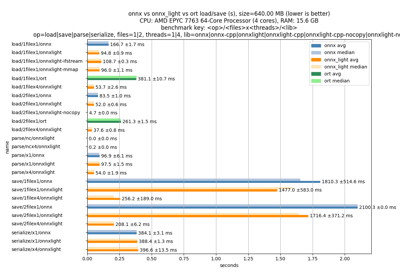
Measures loading and saving time for an ONNX model
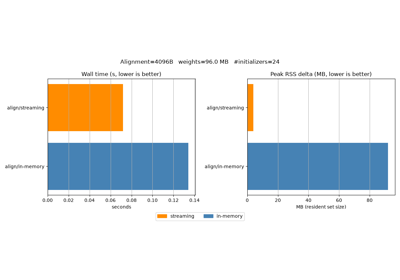
Benchmark streaming vs in-memory alignment of external data
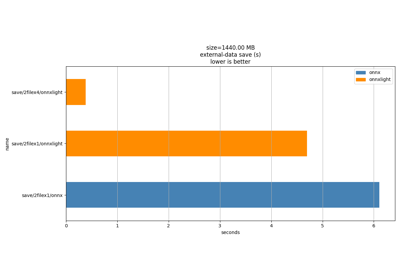
Gallery generated by Sphinx-Gallery
Example last updated
- Date:
2026-10-05